


Citi Mobile®
4.8425.35K Reviews
App Specs
- Version
- 9.97.0
- Updated On
- License
- Free
- Downloads
- 10,000,000+
- Developer
- Citibank N.A.
- Categories
- Finance
- Platform
- Android, iOS
Screenshots
 Analysis by AppCompare
I judge a banking app less by how many buttons it offers than by whether it helps me answer ordinary questions quickly: Did a payment go through? What is my available balance? Can I move money without switching to a computer? Citi Mobile® is built for people who already bank with Citi and want those routine tasks close at hand. It is a free finance app from Citibank N.A., and its appeal is strongest when your accounts are already part of the Citi relationship.
What to consider before choosing it
The first decision is whether you need a bank’s own app or a broader money-management tool. A dedicated banking app is usually the practical choice when you need to check and act on accounts held at that bank. A budgeting app may suit someone who mainly wants to categorize spending across several institutions, while a desktop banking site can be a better fit for long forms or careful review on a larger screen. I see Citi Mobile as the everyday companion to a Citi account, not a universal replacement for every financial tool.
It is available on Android and iOS, is rated for Everyone, and requires operating system version 10 or later. The app’s current version is 9.95.1. Those details matter if you are deciding whether an older phone can run it or whether it is appropriate for a shared family device. Its 4.8 average from around 1.4 million ratings and more than 10 million installs suggest it is widely used, though popularity cannot tell you whether it matches your own banking needs.
Where the app earns its place
The clearest benefit is having account review and everyday actions together. If you use Citi checking, savings, or credit cards, the overview can save the small but repeated effort of opening separate screens or signing in through a browser. I would use it for a quick balance check before making a purchase, then return later to look through transactions with more attention. That split—quick checks on the phone, detailed decisions when you have time—is a sensible way to use a mobile banking app.
Payments and transfers are most useful when they fit into a routine rather than becoming last-minute rescues. For example, I might review a bill after payday, schedule a recurring payment where that arrangement makes sense, and use a transfer when I need to shift money between my own accounts. Before confirming any action, I would check the amount, destination, and timing on the final screen. That simple pause is especially worthwhile when paying from a phone, where it is easy to tap through a task while distracted.
Alerts can add a second layer of awareness, but I would set them deliberately. Start with the notices that help you act—such as activity you want to review promptly—rather than enabling every possible notification and eventually ignoring them all. If a notice does not arrive as expected, check the app’s notification settings and your phone’s system settings; both can affect what appears. For frequent travelers or anyone who keeps a close eye on card activity, carefully chosen alerts are more useful than a noisy stream.
How I would use it during an ordinary day
Imagine I am on my way to pick up groceries and want to make sure a recent deposit is reflected before I spend. I can check the account overview, then glance at recent activity if the balance looks different from what I expected. Later, at home, I can take a moment to review a bill and arrange payment rather than trying to do it while standing in a queue. If I need to move money between accounts, I can handle that separately and verify the recipient account before submitting. The value is not that every task becomes effortless; it is that the routine ones are available when they fit naturally into the day.
Worth Reading Before You Choose

EA SPORTS FC Mobile 26 Is a Bigger Football Game, but It Takes Time

Flipboard Shows What News Apps Must Do Beyond the Feed

Switching to Android Auto Means Rethinking Your Driving Routine

Google Calendar Makes a Crowded Week Easier to Manage

Ludo King Makes the Most of the Minutes Between Plans

Baby Panda World Brings Quick Play to Modern Phones, but Its Game Library Feels Busy
There is also a useful habit here: treat the app as a place to notice and verify, not as a reason to stop keeping basic records. A quick balance view can help with a decision, but pending card activity and scheduled payments may affect what you can safely spend. I would look at recent transactions when something seems off and use a fuller review for recurring commitments. That distinction prevents a convenient snapshot from being mistaken for a complete budget.
Where alternatives may fit better
If you bank with several institutions, a multi-bank dashboard or budgeting service may make it easier to see your overall cash flow in one place. Those tools can be more convenient for comparing accounts, but they are not the same as using a bank’s own app to manage that bank’s services. If most of your financial life is with Citi, keeping routine activity in Citi Mobile may feel simpler; if your main goal is cross-bank planning, a broader organizer may be more appropriate.
A browser can also be the better alternative for a task that involves careful reading, extensive data entry, or a long session. Phones are excellent for checking a balance and handling a straightforward payment, but a larger screen gives more room to inspect details before committing. I would not force a mobile workflow just because it is available. For a complicated issue, the app’s support options can be a starting point, while a call or a full banking session may be easier depending on what needs resolving.
Security deserves the same practical comparison. Biometric sign-in can make access convenient, but it is not a substitute for protecting the phone itself, using a strong device passcode, and avoiding banking on a device you do not control. If you share a phone, consider whether stored access and visible notifications are appropriate for your situation. When traveling, I would also avoid rushing through sensitive actions on an unreliable connection or while someone can easily see the screen.
Small trade-offs that affect daily use
The original setup describes Face ID or Touch ID as convenient sign-in options. That convenience depends on the device and the way you choose to configure access, so I would not assume every phone presents the same sign-in experience. If biometric access is unavailable or not your preference, take time to understand the sign-in method offered on your device before relying on the app while away from home.
Notification setup can take a little patience, and alerts are only helpful if they reach you at the right time and remain readable. I would test the settings with the types of notices I actually need, then adjust the phone’s notification controls if they are being silenced or hidden. Another worthwhile habit is checking the app before a time-sensitive payment rather than waiting until the final moment. That leaves room to correct an entry or choose another route if the task does not go as expected.
Occasional lag is a reported irritation, particularly at busy times, so I would not make the app my only plan for a payment that must be handled at the last possible minute. The sensible workaround is not complicated: do important banking with a little breathing room, confirm completion, and keep a record of what you submitted. That does not remove the inconvenience of a slow session, but it reduces the chance of making a duplicate payment because you were unsure whether the first attempt worked.
Getting Started with Citi Mobile®
First things first, downloading and setting up Citi Mobile® is a breeze. Available for both Android and iOS, this app greets you with a clean, user-friendly interface. Signing in for the first time is smooth sailing, thanks to its intuitive design. You’ve got the option to use Face ID or Touch ID, making logging in as easy as pie. It’s like the app is saying, “Hey, welcome back, let’s get you sorted.”
Features that Stand Out
Now, what really makes this app shine? Let's chat about some of the features that stood out to me.
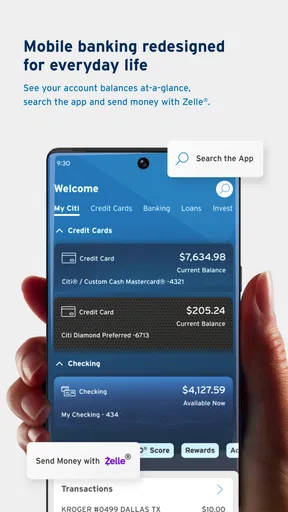
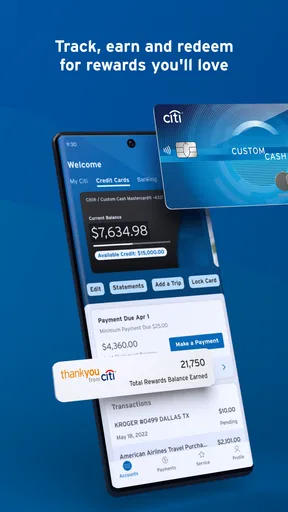
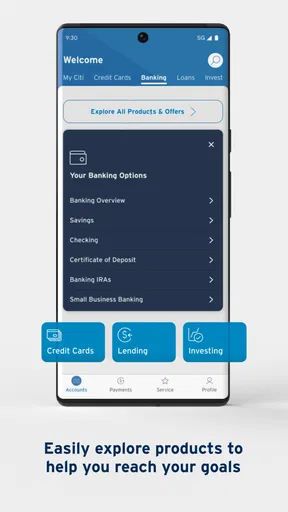
- Account Overview: Right from the get-go, you’ve got access to a comprehensive view of your accounts. Whether it’s checking, savings, or credit cards, everything is laid out beautifully. A quick glance, and you know where you stand financially.
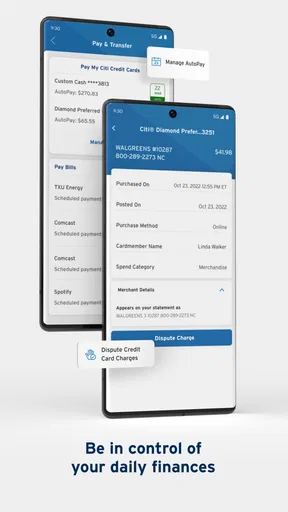
- Bill Payments: Paying bills has never been more convenient. With just a few taps, you can settle your dues, and even set up recurring payments. Say goodbye to late fees!
- Transfer Funds: Need to move money between accounts? Easy peasy. The transfer feature is quick, efficient, and works like a charm.
- Transaction Alerts: I love this one. Get instant notifications about your spending. It’s like having a personal financial assistant keeping tabs for you.
Security and Peace of Mind
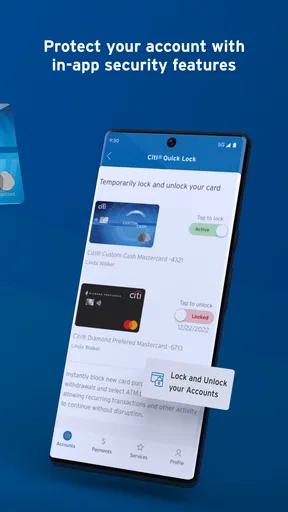
Now, I know what you’re thinking. With all this access, how secure is this app? Rest easy, my friend. Citibank takes security seriously. From multi-factor authentication to encryption, your data is locked down tighter than Fort Knox. Plus, if you ever lose your phone, you can remotely lock the app. Talk about peace of mind!
Customer Support at Your Fingertips
Ever had those moments where you need help ASAP? The app offers a direct line to customer support. Whether through chat or a quick call, Citibank has you covered. It’s like having a financial guru in your pocket, ready to assist.
A Few Quirks
Alright, so no app is perfect, right? While Citi Mobile® delivers on many fronts, I did notice that some users mention occasional lag during peak hours. Nothing too crazy, but worth noting if you’re trying to make a quick transfer on the go. Also, the initial setup for notifications can be a bit finicky, but once it’s done, you’re golden.
Making the switch thoughtfully
If you are moving from a browser-based routine, there is no need to change everything at once. I would first use the app for low-pressure tasks, such as checking activity, then try a routine payment or transfer after confirming the account details. Keep the browser option available until the mobile workflow feels familiar. That approach is especially helpful if you manage bills for a household: learn which steps are quick on the phone and reserve anything that needs careful comparison for a calmer session.
Switching from another bank’s app is a different decision. Citi Mobile is useful when Citi is where you need to bank, but it will not make another institution’s accounts part of Citi’s own service. If you are choosing a primary bank, compare the banking relationship and services you need first; the app should support that decision rather than make it for you. For someone who already uses Citi, the learning cost is modest: sign in, locate the account view, understand the payment flow, and tune alerts before depending on them.
Who will get the most from it
I would recommend it to existing Citi customers who want a straightforward way to check accounts, pay bills, transfer funds, and keep an eye on activity while away from a computer. It is particularly handy for people who prefer handling small banking jobs as they come up instead of saving every task for a monthly desktop session. Citibank N.A. has developed the app for that practical, on-the-go role, and the free price makes trying it a low-commitment choice for eligible customers.
I would hesitate to recommend it as a standalone solution to someone who needs one place to manage accounts across many banks, or to a person who strongly prefers doing financial work on a large screen. It is also not a substitute for taking time to review statements, keep a budget, or contact support when an issue needs more than a quick app action. A strong mobile experience is useful, but it cannot decide whether a payment is affordable or resolve every account question automatically.
Final Thoughts
All in all, Citi Mobile® is a powerhouse app for anyone looking to manage their finances seamlessly. It combines functionality, security, and ease of use in a way that makes banking on-the-go feel less like a chore and more like a convenience. If you’re a Citibank customer, this app is a no-brainer. Go ahead, give it a whirl, and let it revolutionize the way you handle your money.
My recommendation is a little more specific: if you already bank with Citi and mainly want dependable access to everyday account tasks, it is a sensible app to try. Its 4.8 average and around 1.4 million ratings show that many people use it, but the right test is whether its layout and workflow suit you. Start with a balance check, set only the alerts you value, and try a routine payment with time to review the details. If you need broad budgeting across institutions or prefer handling finances on a computer, pair it with the tool or channel that does that job better.
Pros
- User-friendly interface for easy navigation.
- Secure login with biometric authentication.
- Real-time transaction alerts and notifications.
- Customizable dashboard for personalized experience.
- 24/7 customer support through chat and call.
Cons
- Limited features compared to desktop version.
- Occasional bugs during updates.
- Some features require strong internet connection.
- No support for international transactions.
- Complex features may be overwhelming for new users.
FAQs for Citi Mobile®
What features does the Citi Mobile® app offer?
The Citi Mobile® app provides a comprehensive suite of features designed to simplify your banking experience. Users can manage accounts, transfer funds, pay bills, and track spending with ease. Additionally, it offers secure login options such as fingerprint and facial recognition, as well as personalized alerts to keep you informed about your account activities.
Is the Citi Mobile® app secure for online banking?
Yes, the Citi Mobile® app employs advanced security measures to protect your data. It uses encryption and multi-factor authentication to ensure that your banking activities are safe. Furthermore, features like biometric login add an extra layer of security, providing peace of mind when managing your finances on the go.
Can I access customer support through the Citi Mobile® app?
Absolutely, the Citi Mobile® app provides access to customer support directly within the app. Users can easily connect with representatives via chat or phone for assistance with any queries or issues. The app also includes a comprehensive FAQ section and guides to help you navigate common questions.
Does the Citi Mobile® app support international transactions?
Yes, the Citi Mobile® app supports international transactions, allowing you to manage your accounts and transfer funds globally. Users can view exchange rates and send money internationally with ease, making it a convenient option for those who manage finances across borders.
What devices are compatible with the Citi Mobile® app?
The Citi Mobile® app is compatible with both Android and iOS devices. It requires Android 6.0 or later and iOS 11.0 or later, ensuring a wide range of smartphones and tablets can support the app. Regular updates ensure that the app remains compatible with the latest mobile operating systems.


